Sparkle: A Simple and Neat Display Font for Creative Ideas
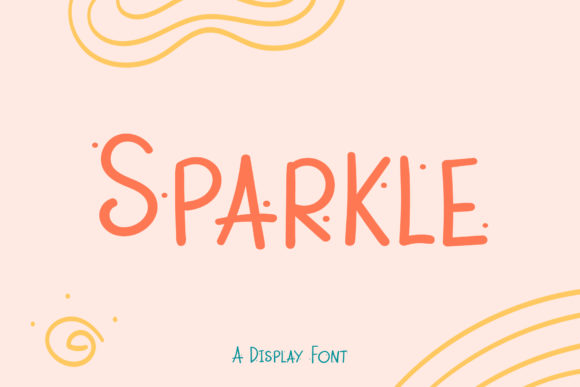
Sparkle is a display font that brings clarity and elegance to visual communication. Designed with simplicity in mind, it features clean lines, balanced proportions, and a modern aesthetic that works across a wide range of applications. Whether you're designing a website, creating marketing materials, or working on a personal project, Sparkle can enhance the readability and impact of your content.
Understanding Sparkle's Role in Design and Communication
Display fonts like Sparkle are used to draw attention, convey tone, and create visual interest. Unlike body text fonts, which prioritize legibility in long passages, display fonts are ideal for headlines, logos, banners, and other elements where visual impact matters more than dense reading.
Sparkle fits into this category perfectly. Its minimalist design ensures that it doesn't overwhelm the viewer but instead complements the overall layout. This makes it a versatile choice for both digital and print media.
When to Use Sparkle in Your Workflow
Sparkle can be integrated at various stages of a creative process:
- Before a project: Use Sparkle for brainstorming sessions or mood boards to set the visual tone.
- During design: Apply it to headlines, call-to-action buttons, or key sections to highlight important information.
- After completion: Incorporate it into final presentations or promotional materials to reinforce brand identity.
This flexibility allows Sparkle to serve as a foundational element in many workflows, from web development to graphic design.
Integrating Sparkle into Your Projects
Adding Sparkle to your creative toolkit requires minimal effort. Once installed, it becomes available in most design software and content management systems. Here’s how you can make the most of it:
Compatibility and Setup
Sparkle is compatible with popular design tools such as Adobe Photoshop, Illustrator, Canva, and Figma. It also supports web use through Google Fonts or by embedding the font file directly into your HTML code.
To ensure consistency across platforms, always verify that the font renders correctly on different devices and screen sizes. Testing is especially important if you plan to use Sparkle in responsive web designs.
Practical Implementation Tips
Here are a few tips for using Sparkle effectively:
- Use it sparingly: Since Sparkle is a display font, avoid using it for large blocks of text. Reserve it for headings, titles, and short phrases.
- Pair it with complementary fonts: Combine Sparkle with a sans-serif or serif font for body text to maintain readability while adding visual contrast.
- Experiment with spacing: Adjust letter and line spacing to improve the font’s appearance, especially when using it for logos or banners.
These small adjustments can significantly enhance the overall look and feel of your work.
Workflow Integration: How Sparkle Enhances Efficiency
Incorporating Sparkle into your workflow can streamline your creative process. For example, when designing a website, using Sparkle for headlines reduces the need for additional formatting or styling, allowing you to focus on layout and content.
For marketers and entrepreneurs, Sparkle can be used to create eye-catching social media posts, email newsletters, and promotional graphics. Its clean and professional look aligns well with branding efforts and helps maintain a cohesive visual identity.
Collaboration and Consistency
When working in teams, ensuring everyone uses the same font is crucial for maintaining a consistent look. Sparkle's availability across multiple platforms makes it an excellent choice for collaborative projects. You can share font files, link to Google Fonts, or provide style guides to keep the design aligned with your brand standards.
Additionally, using Sparkle in templates and reusable assets ensures that your designs remain uniform, even when created by different team members.
Long-Term Use and Quality Control
While Sparkle is a simple font, its effectiveness depends on how consistently it's applied. Establishing clear guidelines for when and how to use it can prevent misuse and ensure that it remains a valuable asset in your workflow.
Regularly reviewing your projects for font usage can help identify areas where Sparkle could be optimized. For instance, if you notice that certain headings appear too small or unclear, adjusting the font size or pairing it with another font might improve the outcome.
It's also worth considering how Sparkle interacts with other design elements, such as colors, images, and layouts. A well-balanced composition will make your content more engaging and easier to read.
Conclusion
Sparkle is more than just a display font—it's a practical tool that enhances the visual appeal of your creative ideas. By integrating it into your workflow, you can elevate the quality of your designs, streamline your processes, and maintain a consistent brand image.
Whether you're a designer, marketer, educator, or entrepreneur, Sparkle offers a simple yet powerful way to make your work stand out. Experiment with it, refine your approach, and discover how it can become an essential part of your creative routine.